
Percentile tracking
A single percentile number is just a snapshot. What matters is the trend. Tinylog shows whether your baby is following their growth curve or drifting between percentile lines — the same thing your pediatrician watches for.
FEATURE
Record weight, length, and head circumference in seconds. Tinylog plots your baby's measurements against WHO growth charts so you can see exactly where they stand — no separate app or website needed.
Your pediatrician tracks growth at every visit. Now you can track it between visits too.
At every well visit, your pediatrician weighs your baby, measures their length, and plots the numbers on a growth chart. But those visits are weeks or months apart — and a lot can change in between.
Parents worry about growth. Is the baby gaining enough? Did they drop a percentile line? Is that normal? A growth tracker gives you visibility between appointments so you're not guessing for months at a time.
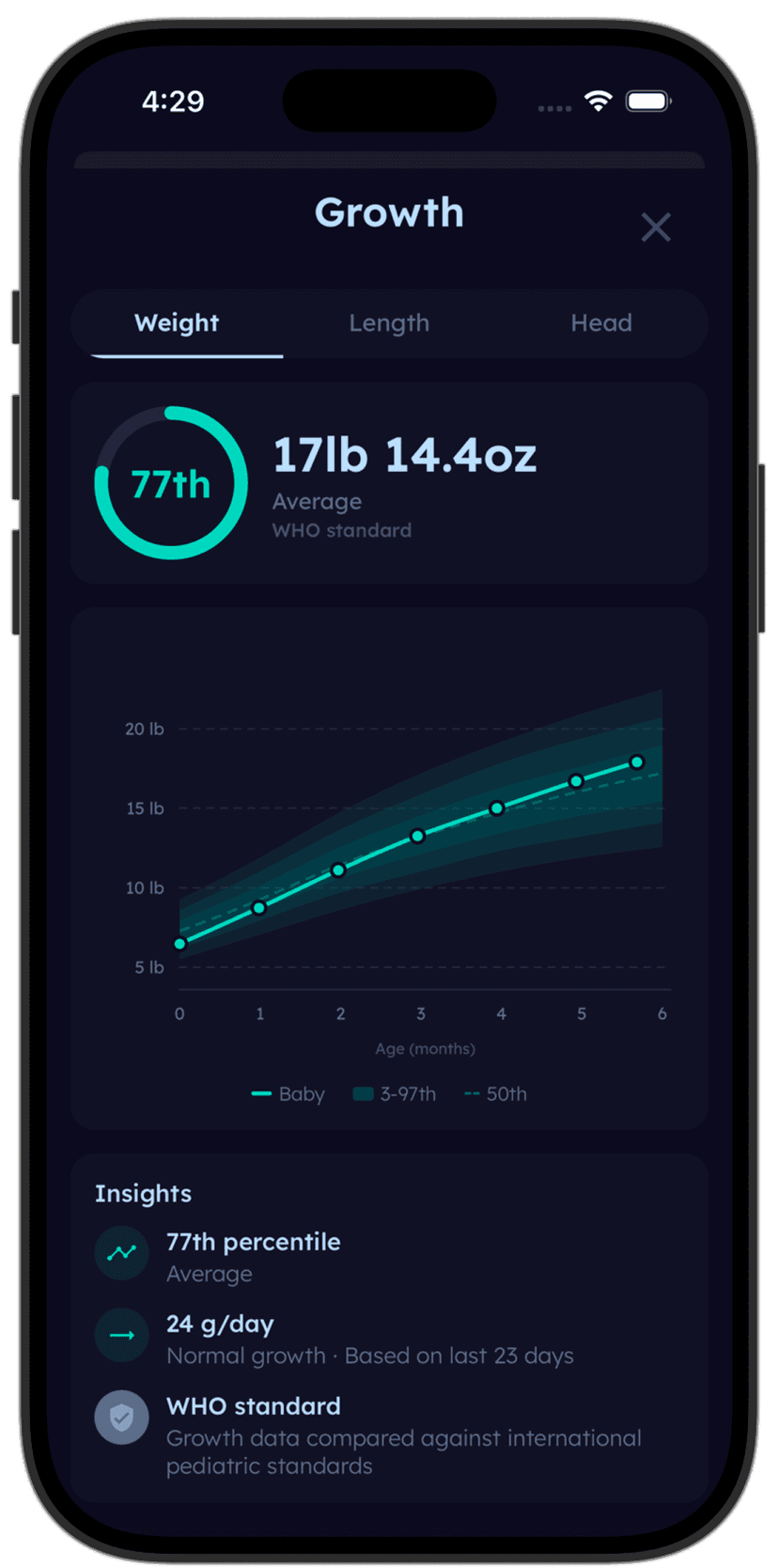
Log a weight or length measurement and Tinylog plots it against WHO percentile curves instantly. See your baby's trend line — not just isolated numbers.


Tinylog makes it easy to log measurements and see where your baby falls on standard growth curves.
Log a measurement: Tap "Growth" and enter weight, length, or head circumference. Select the date — usually the day of a doctor visit or a home weigh-in. Tinylog stores the measurement and adds it to your baby's growth history.
See percentile curves: Tinylog plots every measurement against WHO growth charts for your baby's age and sex. You'll see percentile lines (3rd, 15th, 50th, 85th, 97th) and your baby's data points so you can see their trend at a glance.
Track multiple metrics: Weight, length, and head circumference are tracked separately, each with their own percentile curve. You can log all three at once after a doctor visit or add them individually as you get new measurements.
A single percentile number is just a snapshot. What matters is the trend. Tinylog shows whether your baby is following their growth curve or drifting between percentile lines — the same thing your pediatrician watches for.
Is your baby gaining weight at a healthy rate? Tinylog shows weight changes between measurements so you can see the pace of gain, not just the current number.
Length is harder to measure accurately at home, but when you log it after doctor visits, Tinylog builds a picture of your baby's growth trajectory over months — helping you understand whether they're on track.
Head growth is an important developmental marker in the first year. Tinylog plots head circumference measurements on their own percentile curve so you have a complete picture of your baby's growth.
Home weigh-ins logged in Tinylog fill the gaps between well visits. See the upward trend over weeks and months — so you're not guessing until the next appointment.
Your baby's 4-month appointment isn't for three weeks, but you're worried about weight gain. A home weigh-in logged in Tinylog shows they're following their curve — and you can stop Googling at midnight.
Preemie parents often track growth more frequently. Tinylog gives you a place to log every measurement and see the upward trend over time — a visual reminder of how far your baby has come.
Pull up your baby's growth chart on your phone and compare it with the doctor's measurements. Having your own record means you can ask informed questions and catch data entry errors.
Focus on the trend, not individual measurements. One weigh-in that's slightly lower doesn't mean there's a problem. Growth curves are meant to be read over weeks and months. If your baby is generally following their percentile line, they're doing great.
Want to understand growth percentiles better? Check out our free guides: