GUIDE

Best Baby Growth Tracker Apps (2026)

The best growth tracker depends on your needs: tinylog offers WHO + Fenton charts with AI insights, Huckleberry provides solid growth logging, and Baby Tracker by Nighp covers the basics for free.

Growth tracking is one of those things that sounds simple — log a weight, see a chart — but the details matter. Which growth chart does the app use? Can you track length and head circumference too? Can your pediatrician see the data? We compared the top options.

Full Disclosure: We Made One of These Apps

We're the tinylog team. We're including our app in this comparison because we believe it does growth tracking well — but we're committed to being honest about every option. Your baby's growth is too important for biased recommendations. Pick whatever works best for you.

Growth Tracker Apps Compared
tinylog
PriceFree core + Premium
ChartsWHO + Fenton (preemie) charts with percentile overlays
MeasurementsWeight, length, head circumference
Key FeaturesPercentile calculation, trend visualization, AI insights, preemie-specific charts
Data SharingExportable data and charts
Best ForParents who want medical-grade charts, especially preemie parents
Huckleberry
PriceFree + Premium ~$10/month
ChartsBasic growth chart
MeasurementsWeight, length, head circumference
Key FeaturesGrowth logging alongside sleep and feed tracking, SweetSpot nap predictor
Data SharingData export available
Best ForParents focused on sleep who also want growth tracking
Baby Tracker (Nighp)
PriceFree (ad-supported) + Pro
ChartsBasic growth chart with percentiles
MeasurementsWeight, length, head circumference
Key FeaturesSimple logging, percentile reference, part of comprehensive baby tracker
Data SharingCSV export
Best ForParents who want basic free growth tracking
Glow Baby
PriceFree + Premium
ChartsGrowth chart with milestone integration
MeasurementsWeight, length, head circumference
Key FeaturesGrowth percentiles, community features, article content
Data SharingIn-app sharing
Best ForParents who want community features alongside tracking
Sprout Baby
PriceOne-time purchase ~$5
ChartsWHO-based growth charts
MeasurementsWeight, length, head circumference
Key FeaturesClean design, milestone tracking, growth charts
Data SharingPDF export
Best ForParents who prefer one-time purchase over subscription
Pricing and features as of early 2026. We've tried to be accurate — if something has changed, let us know.

What Actually Matters in a Growth Tracker

Not all growth tracking features are created equal. Here's what to look for:

Which growth chart does it use?

The WHO growth standards are recommended for babies 0-2 years. CDC charts are for ages 2+. Fenton charts are essential for preemie babies. Check what chart your app uses — it directly affects the percentile number you see. An app using CDC charts for an infant can give a different (and potentially misleading) percentile than one using WHO charts.

Can you track all three measurements?

Weight gets the most attention, but length and head circumference matter too. The best growth trackers let you log and visualize all three. Head circumference is especially important in the first year as it tracks brain development.

Does it show percentiles and trends?

Logging numbers is useful. Seeing them plotted on a growth chart with percentile lines is much more useful. The trend over time — not any single data point — is what matters for assessing growth. Look for apps that visualize the curve, not just list the numbers.

Can you share data with your pediatrician?

The most useful feature of a growth tracker is being able to bring data to your doctor. Whether it's a PDF export, a screenshot of the growth chart, or a data file — make sure you can get the information out of the app when you need it.

Does it support preemie-specific charts?

If your baby was born before 37 weeks, standard WHO charts don't tell the full story. Fenton growth charts are the NICU standard for plotting preterm infant growth. Very few apps include them — if your baby is a preemie, this feature matters a lot.

Why Growth Charts Matter More Than Raw Numbers

Logging your baby's weight as "14 lbs 3 oz" is helpful. Seeing that weight plotted on a WHO growth chart at the 45th percentile, with a line showing how they've tracked from the 40th to the 45th over the past four months — that's informative.

Growth charts give context. They show you whether your baby's weight gain is accelerating, steady, or slowing. They show whether weight, length, and head circumference are growing proportionally. They show the trend — which is what your pediatrician actually cares about.

When evaluating growth tracker apps, prioritize ones that visualize the data on real growth charts. A list of numbers in a spreadsheet is data. A plotted growth curve is information.

For more on what growth charts mean and how to read them, see our growth percentiles guide or try our free online growth chart plotter.

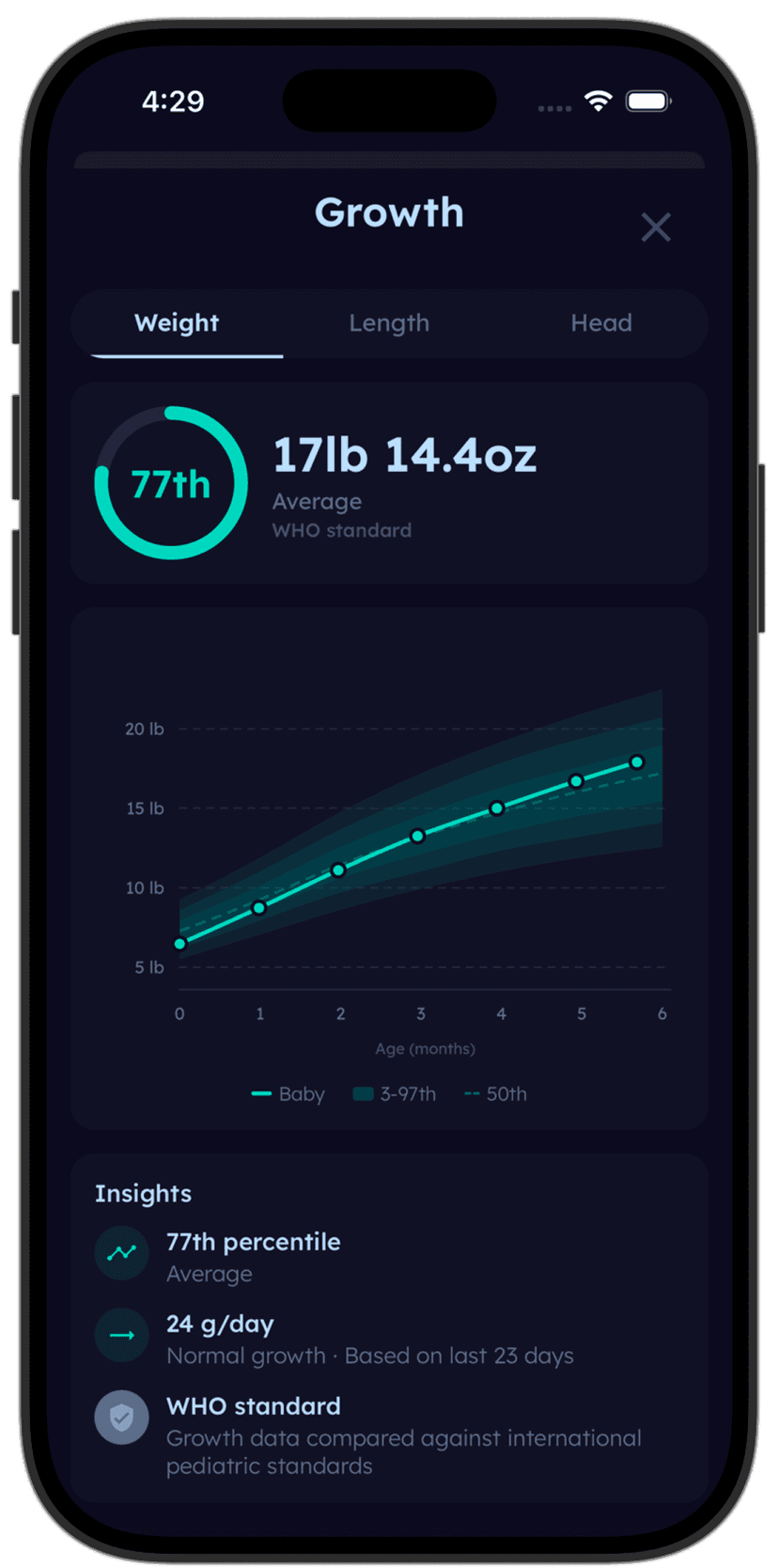
tinylog growth chart showing baby weight plotted on WHO percentile curves

Plot your baby's growth on real medical-grade charts — WHO and Fenton.

tinylog is one of the only baby trackers that includes both WHO growth charts (for term babies) and Fenton charts (for preemies). Log weight, length, and head circumference, see percentiles instantly, and track the trend over time.

Download on the App StoreGet It On Google Play

A Note for Preemie Parents

If your baby was born prematurely, growth tracking takes on extra importance — and most apps aren't well-equipped for it. Standard WHO charts are designed for term babies and can make a preemie look concerning when they're actually growing appropriately for their gestational age.

Fenton growth charts are the NICU standard for tracking preterm infant growth. They plot by gestational age rather than chronological age, giving a more accurate picture of how your preemie is growing. Very few consumer apps include Fenton charts — it's worth checking if this matters for your family.

For more on preemie-specific considerations, see our best baby tracker for preemies guide.

Our Recommendation

For the most detailed growth charts including preemie support: tinylog (that's us — WHO + Fenton charts, percentile overlays, AI insights).

For growth tracking as part of sleep optimization: Huckleberry (SweetSpot predictor is genuinely useful, growth tracking is solid).

For free, basic growth tracking: Baby Tracker by Nighp (does the job without a subscription).

For one-time purchase: Sprout Baby (clean design, no recurring cost).

The best app is the one you'll actually use consistently. Growth tracking only works if you log measurements regularly — so pick the app that makes logging easy and fits your routine.

Related Guides

Sources

  • WHO Child Growth Standards — chart specifications and recommendations
  • CDC Growth Chart guidelines for clinical use
  • Fenton TR, Kim JH. "A systematic review and meta-analysis to revise the Fenton growth chart for preterm infants." BMC Pediatrics, 2013.
  • App Store and Google Play listings for all compared apps (accessed February 2026)

This guide is for informational purposes only and is not a substitute for professional medical advice. If you have concerns about your baby's growth, please consult your pediatrician.

Want this comparison in your inbox?
We'll email you this breakdown so you can compare apps at your own pace.
WHO and Fenton charts. Percentiles at a glance. One app.
Download tinylog free — plot your baby's growth on real medical-grade charts.
Download on the App StoreGet It On Google Play